
Is that USPS redelivery text a scam?
Waiting for a parcel makes a missed-delivery text easy to believe. USPS lets you schedule eligible redelivery for free. Before you pay a fee or correct an address, check the tracking number from your original order.
Check a delivery link →One free scan. Full findings require Pro.
Have a tracking number in the link? Paste only the public hostname.
Start with the order you actually placed
Open the retailer’s app or your account from a bookmark. Find the order and copy its tracking number. Type usps.com into a new browser tab and enter that number under Tracking. If you have a paper missed-delivery slip, you can also use the barcode number on PS Form 3849 to schedule an eligible redelivery. USPS offers that service free. USPS redelivery instructions
Suppose your order history says the parcel is still in transit, while the text says it is at the depot awaiting payment. You already have a way to follow the parcel. Leave the text alone and follow updates from the order. Even when both mention a delay, check the remedy through USPS itself. A matching detail can be a coincidence. FTC guidance for delivery texts
Read the address behind the delivery claim
The Postal Inspection Service says USPS text tracking starts with a request for a specific tracking number. Its tracking texts do not contain a web link. An unexpected text asking you to visit a page and enter a card number to release a parcel fits the pattern the agency warns about. Postal Inspection Service alert
tools.usps.com- The USPS scheduling page uses this host. It ends in usps.com.
usps.com.redelivery.example- Here, usps.com is at the beginning. The address ends in redelivery.example. This is a fictional example.
When the text contains a short link, its visible address can hide the eventual destination. If the short link is unique to you, leave it out of public scanners and go straight to your order. You can still report the message.
How to check a public delivery link in Scanify
- Copy the address without visiting it. On a computer, use the link’s context menu. On a phone, use Copy Link if your messaging app offers it.
- Keep shipment details private. If you see a tracking number, name, address or personal code in the link, copy only the public hostname. A hostname check covers that site, not the removed page or its redirects. How Scanify shares submitted URLs
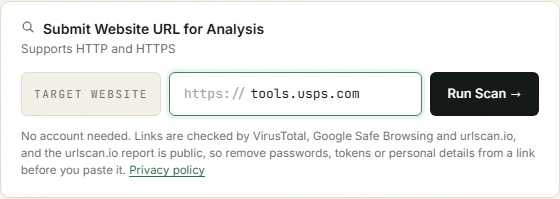
- Paste the public address and select Run Scan. You can run one scan free. Scanify then offers checkout to see the verdict and source findings. In a Pro report, compare the reported destination with the official hostname and inspect any source that flagged the page. A low score cannot confirm who sent the text or where your parcel is. Open the Scanify URL scanner
If you already clicked or paid
Opened the page? Close it and check the order independently. Entered card details? Call the issuer using the number on your card. Tell them the card details went into a suspected fake delivery page, mention any charge and ask how to protect the account. If you also entered a password, change it on the real service and anywhere else you reused it. FTC recovery steps
You can forward a suspicious text to 7726 in the U.S. To report USPS impersonation, send the message and a screenshot to spam@uspis.gov. Include the sender, date and what happened. Keep your full card number and passwords out of the report. Postal Inspection Service reporting instructions
Have a public delivery address to check?
Copy the public web address from the message. Keep your tracking number with USPS.
Check a delivery link →